- Key Takeaways:
- The Big Picture: More Than Half of U.S. Homes Are Now Connected
- The Living Room: Start With a Smart Speaker, Then Build Outward
- The Bedroom: The Thermostat Belongs Here — and Everywhere Else
- The Front Door: Security Devices Are What Buyers Actually Want First
- The Kitchen: Think Small and Practical Before You Think Smart Appliances
- The Bathroom: The Most Underrated Smart Home Investment Is
- The Garage and Exterior: Two Devices, Zero Regrets
- Don’t Forget the Foundation: Wi-Fi Mesh Before You Go Deep
- Your Room-by-Room Priority Checklist
- One Final Piece of Advice: Pick an Ecosystem and Commit
Key Takeaways:
- Sequence beats selection. The order you buy devices in matters more than which specific brand or model you choose. Starting with infrastructure (a smart speaker as your hub) makes every subsequent device more useful and easier to set up.
- The thermostat is the highest-ROI device in your home. Saving 10–15% on HVAC costs — which eat up 45–55% of your total energy bill — typically pays back the $150–$250 device cost within a year, especially when utility rebates are factored in.
- Security is what buyers actually prioritize first. With 61% of U.S. households now owning at least one security camera, video doorbells and smart locks aren’t novelties anymore — they’re expected features that can boost resale value by up to 12%.
- The $20 water leak sensor is the most underrated device in any home. With water damage claims averaging over $10,000, a few cheap sensors under sinks and behind toilets offer arguably the best cost-to-protection ratio of any smart home purchase.
- Pick one ecosystem before you buy anything. Committing to Amazon Alexa, Google Home, or Apple HomeKit upfront — and pairing it with a strong mesh Wi-Fi network — is what separates a smart home that feels seamless from one that feels like a pile of disconnected gadgets.
You’ve probably scrolled past a dozen “best smart home devices” listicles that basically just reprint the Amazon bestseller chart. This isn’t one of those. This guide is built around real data — five stats from five credible sources published in 2025 and 2026 — and it’s designed to answer the question most buyers actually have: where do I start?
Because here’s the thing: sequence matters more than selection. Buy the wrong device first, and you end up with a novelty that gets unplugged after three weeks. Buy in the right order, and each device you add makes the next one more useful. Smart homes compound. They just need a logical foundation.
Let’s go room by room.
The Big Picture: More Than Half of U.S. Homes Are Now Connected
Before we get tactical, it helps to understand what the market actually looks like in 2026 — because it tells you a lot about which devices have proven their worth versus which ones are still fighting for a use case.
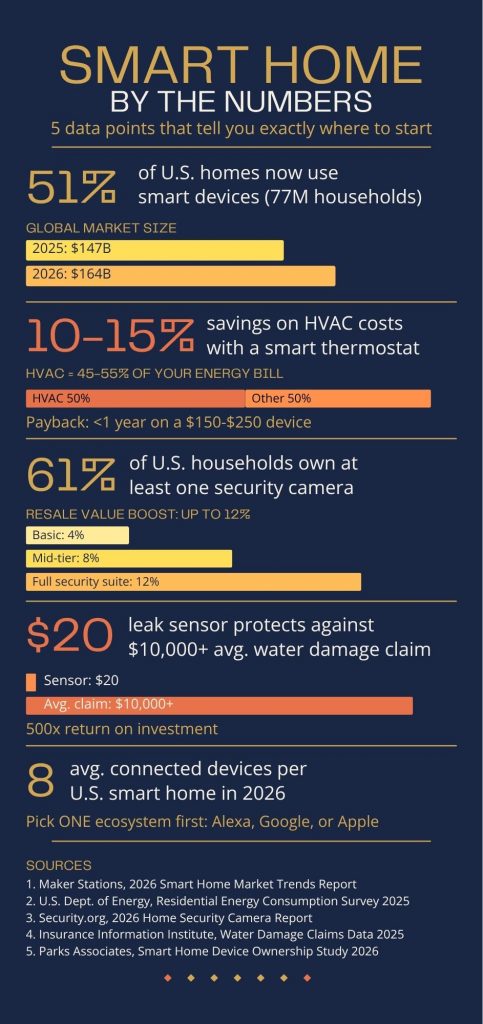
According to Maker Stations’ 2026 Smart Home Market Trends report, about 77 million U.S. homes — roughly 51% of all households — are now actively utilizing smart home devices. That’s a majority. Smart home technology has crossed the line from early-adopter territory into genuine mainstream adoption, and the global market hit $164 billion in 2026, up from $147 billion in 2025.
What does that tell us? A few things worth unpacking.
First, the devices that have driven that adoption aren’t flashy. They’re thermostats, security cameras, smart speakers, and lighting systems — the workhorses, not the showpieces. The average U.S. smart home runs on eight connected devices, which means most households aren’t building elaborate ecosystems; they’re solving specific problems with specific tools.
Second, the growth has been fueled by falling prices and improving reliability. Matter — the universal smart home standard now supported by Apple, Google, Amazon, and Samsung — has dramatically improved how well devices from different brands talk to each other. In 2026, you no longer have to bet your entire setup on a single ecosystem. That’s a meaningful change from even two years ago.
Third, the 49% of households still without smart devices aren’t necessarily skeptics — they’re often just waiting for a clear “start here” signal. That’s what this guide is for.
The Living Room: Start With a Smart Speaker, Then Build Outward
The living room is typically the highest-traffic room in a home, which makes it the most logical place to establish your command center. And the command center for any smart home setup is a smart speaker or smart display.
What to Install First:
Amazon Echo, Google Nest Hub, and Apple HomePod mini are the main players. All three give you voice control over whatever else you’ll install, serve as a Bluetooth speaker and information hub, and cost between $50 and $130. The choice between them largely comes down to ecosystem: if you’re deep in Apple products, go HomePod. If you want the broadest device compatibility, Echo or Nest Hub.
Why start here rather than with something more tangible? Because a smart speaker is infrastructure. It’s the thing that makes every future device easier to use. Adding a smart bulb is dramatically more satisfying when you can just say “turn on the living room lights” from the couch. Adding a smart thermostat is more intuitive when you can check the temperature without picking up your phone.
Layer 2 — Smart Lighting:
The U.S. Department of Energy confirms that LED bulbs cut lighting energy use by around 75% compared to traditional incandescents, and the average household saves roughly $225 per year by making the switch. Smart LED bulbs take that baseline further: automated schedules, motion-triggered controls, and dimming capabilities can reduce lighting energy consumption by an additional 20–30% on top of the standard LED savings, according to data from Security.org. For a living room where lights are left on for hours at a stretch, that adds up quickly.
Philips Hue and LIFX are the premium options. Wyze and Sengled offer solid budget picks under $15 per bulb. Both integrate seamlessly with Alexa and Google Home.
Layer 3 — Smart Plug:
A $15 smart plug on your most-used lamp or fan is your easiest first win. Set it to turn off at midnight. Control it from your phone when you forget. Track how much energy that floor lamp actually uses. It’s not glamorous, but it’s the kind of small automation that stacks up meaningfully over a year.
The Bedroom: The Thermostat Belongs Here — and Everywhere Else
Here’s an argument you might not expect: the most important smart device for your bedroom isn’t a sleep tracker or a sunrise lamp. It’s a thermostat. Not because it lives in the bedroom (it usually doesn’t), but because it controls the conditions you sleep in — and because no other smart home device offers a clearer financial return on investment.
What to Install First:
The data here is unusually consistent across sources. Climate Experts’ 2026 analysis — citing multiple industry studies and real-world utility data — finds that the average household saves between 10% and 15% on heating and cooling costs annually with a smart thermostat installed. HVAC systems account for roughly 45–55% of total home energy spending, so a 10–15% reduction on that slice of the bill translates to meaningful real dollars.
Based on CLIQ for Home’s 2026 breakdown, the average combined non-water utility bill runs around $4,300 per year in the U.S. Apply the 45–55% HVAC share and you’re looking at roughly $1,935–$2,365 per year that your thermostat directly controls. Shave 10–15% off that figure and you’re saving $193–$354 annually — against an upfront cost of $150–$250 for a quality device. Most households break even within a year, and many utility providers now offer $50–$100 rebates on ENERGY STAR-certified models, accelerating that payback further.
The Nest Learning Thermostat, Ecobee Smart Thermostat Premium, and Honeywell Home T9 are the three worth considering. All are ENERGY STAR certified and support Alexa, Google Home, and Apple HomeKit. Ecobee in particular includes occupancy sensors you can place in individual rooms — genuinely useful if your bedroom is far from the main thermostat and often too warm or too cold as a result.
Layer 2 — A Smart Sunrise Alarm:
A light-based wake-up system (Hatch Restore, Philips SmartSleep) gradually brightens 20–30 minutes before your alarm time, mimicking dawn. It won’t lower your energy bill, but it’s one of the few bedroom gadgets that gets used daily and actually improves how you feel in the morning. Small upgrade, outsized quality-of-life effect.
Layer 3 — Smart Air Quality Monitor:
If you’re already thinking about HVAC efficiency, a CO₂ and humidity monitor (Airthings Wave or Govee Air Quality Monitor) closes the loop. High CO₂ levels during sleep are associated with reduced sleep quality. It gives you actionable data — not just a number on a screen.
The Front Door: Security Devices Are What Buyers Actually Want First
There’s a persistent disconnect in how smart home guides are written versus how people actually shop. Most guides lead with thermostats or speakers. Most buyers, it turns out, lead with security.
SafeHome.org’s 2026 Home Security Market Report found that 61% of U.S. households now have at least one security camera, marking a notable increase from 52% in 2024. That’s around 74.9 million homes with indoor or outdoor cameras. Video doorbells specifically are owned by 58.9 million Americans, with Ring holding 43% brand recognition among security camera users.
Those numbers reflect something real: the threat of package theft, porch intrusions, and general front-door anxiety has driven security camera adoption faster than almost any other smart home category. And the investment has a second-order financial benefit — Guardian Protection’s January 2026 analysis found that smart security tech can increase a home’s resale value by as much as 12%, with buyers increasingly expecting to see video doorbells and smart locks as standard features.
What to Install First:
A video doorbell. Ring Video Doorbell (wired or battery) and Google Nest Doorbell are both under $200, require no professional installation, and deliver the two things that matter most — real-time alerts when someone approaches your door, and recorded footage if something does happen. The deterrence effect alone is significant; most opportunistic theft happens at properties without visible cameras.
Layer 2 — Smart Lock:
Yale Assure Lock 2 and Schlage Encode Plus are the leading options, both under $250 and compatible with all three major ecosystems. Keyless entry is convenient; the more valuable feature is the access log — knowing exactly when your door opened and closed, and the ability to issue temporary codes to contractors, houseguests, or dog walkers without duplicating physical keys.
Layer 3 — Outdoor Security Camera:
A second camera covering the driveway or side entrance is where most households land eventually. The Arlo Pro 4 and Ring Spotlight Cam offer 2K or 4K resolution, color night vision, and motion-triggered alerts. If you’re buying, check whether local storage is available — paying $3–$10/month in perpetuity for cloud storage is a hidden cost worth factoring into your decision.
The Kitchen: Think Small and Practical Before You Think Smart Appliances
The smart kitchen is one of the most overhyped categories in the smart home market. Wi-Fi-enabled ovens, app-connected coffee makers, and cameras-inside-your-fridge sound compelling in a product launch keynote and get used far less than expected in daily life.
That’s not to say the kitchen can’t be meaningfully upgraded — it absolutely can. The advice is just to start with cheap, high-utility tools rather than expensive, low-utility ones.
What to Install First:
Smart plugs on your highest-use countertop appliances. The coffee maker, the electric kettle, the toaster oven. A smart plug lets you schedule your coffee maker to start brewing before your alarm goes off. It lets you check remotely whether you left the toaster oven on. It tracks energy draw, which — for high-wattage kitchen appliances — can be surprisingly eye-opening.
Layer 2 — Smart Display:
An Echo Show 10 or Google Nest Hub Max on the counter is the kitchen upgrade that actually gets used every day. Hands-free recipe assistance while cooking, setting multiple timers simultaneously, controlling your music without touching your phone — these are small frictions eliminated dozens of times a week. The 10″ screen size matters; smaller smart displays feel cramped for recipe viewing.
Layer 3 — Smart Appliances (only when replacing):
If your dishwasher or range is due for replacement anyway, a smart model makes sense — not as a primary reason to buy, but as a reasonable premium on something you needed regardless. Smart dishwashers can run during off-peak electricity hours automatically, send push notifications when a cycle finishes, and flag potential maintenance issues before they become expensive repairs. Paying $100–$200 more for that capability on a machine you were buying anyway is reasonable. Buying a $2,000 smart fridge for the camera feature is not.
The Bathroom: The Most Underrated Smart Home Investment Is
This section is the one most people skip. It shouldn’t be.
What to Install First:
The bathroom — and by extension, anywhere in your home with water pipes, appliances, or fixtures — is where one of the highest-ROI smart devices in existence sits largely uncelebrated: the water leak sensor.
Water damage is the second most common cause of homeowners insurance claims. According to the Insurance Information Institute, cited by Security.org, water damage claims average above $10,000 — with many policies carrying deductibles of $1,000 or more. A slow drip from a cracked supply line under a bathroom sink can cause thousands in floor and cabinet damage before it’s noticed. A $20 leak sensor detects that drip the moment it starts and sends an alert to your phone.
The math here is almost absurdly favorable. A four-pack of Govee or Aqara water leak sensors runs around $40–$60 total. Place them under the bathroom sink, behind the toilet, at the base of the shower, and — if your washer is nearby — at the washing machine connection. You’ve just protected thousands of dollars of potential damage for the cost of two restaurant meals.
9to5Mac’s January 2026 assessment put it plainly: in 2026, the water leak sensor remains the most critical piece of smart home hardware for homeowners who want genuine peace of mind rather than novelty. It’s the rare device that earns its place not through daily engagement, but through the one moment it matters — the moment a pipe fails at 2 AM and your phone buzzes before you wake up to a flooded floor.
Layer 2 — Smart Exhaust Fan:
A humidity-triggered smart bathroom fan (Broan SmartSense or Delta BreezSmart) activates automatically when moisture levels rise and shuts off when humidity returns to normal. It runs longer when it needs to and less when it doesn’t — quietly protecting your bathroom from the mold risk that comes from inadequate ventilation. This matters especially in older homes where bathroom fans are undersized for the space.
Layer 3 — Motion-Triggered Night Lighting:
A motion-triggered dim light in the bathroom hallway is a quality-of-life upgrade that takes five minutes to install. Nobody wants a jarring overhead light at 2 AM. A warm, dim automatic light that activates when you walk past and fades when you return to bed is a small change that becomes invisible in the best possible way.
The Garage and Exterior: Two Devices, Zero Regrets
Once the interior is covered, two exterior additions stand out as clear winners.
Smart Garage Door Controller:
A Chamberlain myQ or Meross Smart Garage Door Opener ($30–$50) adds remote control and real-time status to your existing garage door opener — no replacement needed. You can check from anywhere whether the garage is open, set it to auto-close if left open beyond a set time, and receive alerts whenever it activates. This is the device that every household with an attached garage eventually wonders why they didn’t buy sooner.
Smart Outdoor Lighting:
Motion-activated smart lights at entry points serve dual purposes: safety on dark paths and deterrence for intruders. The Philips Hue Outdoor lineup and LIFX outdoor bulbs connect to your existing ecosystem and automatically adjust to sunset rather than a fixed time — meaning they track seasonally without any input from you.
Don’t Forget the Foundation: Wi-Fi Mesh Before You Go Deep
One recommendation that cuts across every room: if your home is over 1,500 square feet and you’re planning to add more than four or five smart devices, invest in a Wi-Fi mesh system before you go further.
Smart devices are only as reliable as the network they run on. A weak signal to the thermostat means delayed responses. A dead zone in the garage means the door controller drops its connection. A Google Nest WiFi Pro, Eero Pro 6E, or TP-Link Deco system ($150–$300 for a full-home setup) eliminates these frustrations at the source. It’s the least exciting smart home purchase and the one with the highest reliability impact.
Your Room-by-Room Priority Checklist
| Room | Start Here | Layer 2 | Layer 3 |
| Living Room | Smart speaker or display | Smart LED lighting | Smart plug |
| Bedroom | Smart thermostat | Sunrise alarm light | Air quality monitor |
| Front Door | Video doorbell | Smart lock | Outdoor security camera |
| Kitchen | Smart plugs on appliances | Smart display | Smart appliance (on replacement) |
| Bathroom | Water leak sensors | Smart exhaust fan | Motion night light |
| Garage/Exterior | Smart garage controller | Motion outdoor lighting | — |
One Final Piece of Advice: Pick an Ecosystem and Commit
Before you order anything, decide which ecosystem you’re building in — Amazon Alexa, Google Home, or Apple HomeKit. Each has trade-offs: Alexa has the broadest device compatibility, Google Home integrates most naturally with Android and Nest devices, and HomeKit offers the tightest privacy controls and the smoothest experience if you’re all-in on Apple.
Most devices support at least two of the three platforms, and Matter compatibility is expanding rapidly in 2026, making cross-ecosystem setups increasingly viable. But for day-to-day convenience, having a primary platform with a dedicated hub (a smart speaker or display) as your control center will make your setup feel cohesive rather than cobbled together.
The best smart home isn’t the one with the most devices. It’s the one you actually use.